

unittests setup and tearDown.
__init__.py
datetime module.
__str__
isoformat()Example Overview of Initial Structure.
Unittests in OOP Practice.
*argsand**kwargsinside the__init__
Unittest setup and tearDown :
setUpmethod is called first.The test method runs and performs the tests.
tearDownmethod is called after the test method has completed.
This process is repeated for each test method in the test case class.
The setUp method is useful for initializing resources or objects that are required for the test. The tearDown method is useful for cleaning up any resources, temporary files, or data created during the test.
Here's an example to illustrate the setUp and tearDown methods:

setUp method sets up the values of self.a and self.b before each test method runs, and the tearDown method resets these values to None after each test method. This ensures that each test method starts with the same initial state for self.a and self.b.
if __name__ == '__main__':
unittest.main()is a common practice in Python when you're writing unit tests using the
unittestframework. This condition is used to ensure that theunittest.main()function is only called when you directly run the script as the main program, and not when it is imported as a module in another script.
__init__.py
The __init__.py file is a special file in Python used to indicate that a directory should be treated as a package. When a directory contains an __init__.py file, Python recognizes it as a package, and you can import modules from that directory as if it were a single module.
With this __init__.py, if you have a directory structure like this:

Without it, Python treats the directory as a simple directory and won't recognize it as a package.
Current time in Python
In Python, you can get the current date and time using the datetime module from the Python standard library. Here's how you can do it:

current_datetime variable will hold the current date and time in a datetime object. The output will be in the format: YYYY-MM-DD HH:MM:SS.ssssss.__str__
Allows you to define a string representation of an object. It is part of the Python data model and is used to provide a more readable or user-friendly representation of an object when it is converted to a string using the str() function or when the object is used in a string context (e.g., when printing or concatenating with other strings).

__str__ method is not defined for a class, Python will fall back to using the default string representation,isoformat()
A built-in method of the datetime object, which is part of the datetime module. It is used to format a datetime object into an ISO 8601-compliant string representation.
The ISO 8601 format is an international standard for representing dates, times, and combined date-time values. It has a well-defined format that is easily readable by both humans and machines, and it follows the pattern :
YYYY-MM-DDTHH:MM:SS.ssssss
(where T separates the date and time components, and ssssss represents microseconds).
Here's how you can use the isoformat() method of a datetime object:
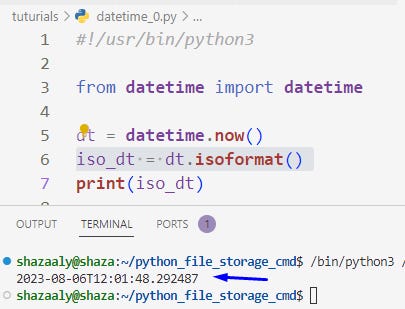
Converts the datetime object dt to an ISO 8601-compliant string using the isoformat()Example Overview of Supposed Initial Structure Example:
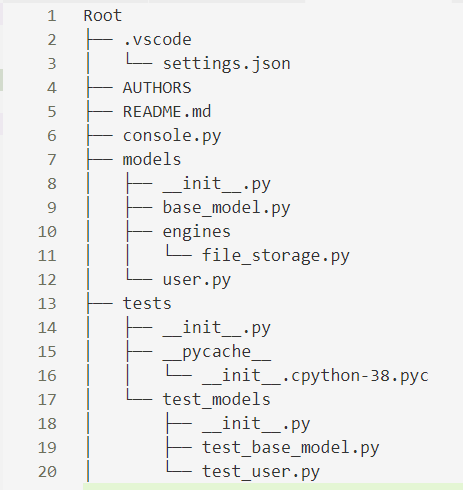
*args and **kwargs inside the __init__
In this example, the Person class takes two mandatory arguments name and age. The *args collects any additional positional arguments provided during the instantiation and stores them in a tuple. The **kwargs collects any additional keyword arguments provided during instantiation and stores them in a dictionary.

Saving objects to a file:

BaseModel) to a Python dictionary representation (<class 'dict'>). Then, it is converted into a JSON-formatted string (<class 'str'>), written to a file, read back into a string, converted back to a dictionary, and finally used to create a new instance of the original class (BaseModel). This is a common process for serializing and deserializing data to and from files or when transmitting data over the networkUnittests in practice:
May be you need to set initial default value in init constructor to none to guard against Error:
TypeError: __init__() missing 3 required positional arguments: 'id', 'created_at', and 'updated_at'
When run unittest, run it from root with : Example
python3 -m unittest tests/test_models/test_base_model.pyAND with
python3 -m unittest discover testsself.assertIsInstance(...): This is an assertion method from theunittest.TestCaseclass. It checks if the first argument (the object being tested) is an instance of the second argument (the expected class). If the assertion passes, the test case passes; otherwise, it fails.How to check if 'id' is a valid UUID ?
We check if the
idattribute is a valid UUID by attempting to create a UUID object from it usinguuid.UUID(my_model.id). If this conversion is successful, it means theidis a valid UUID.HOW ?
First let’s explore UUID :
uuid.UUID(my_model.id): This expression creates aUUIDobject from the given UUID string. Theuuid.UUIDconstructor takes a string as an argument and converts it into aUUIDobject. If the provided string is a valid UUID, it returns the correspondingUUIDobject.Example in testing :
self.assertIsInstance(uuid.UUID(my_model.id), uuid.UUID)

UUID object is successful and the resulting object is an instance of the uuid.UUID class.Timestamp testing:
Check if 'created_at' and 'updated_at' are datetime objects : same idea as uuid instantiation validation.
We verify that the
created_attimestamp is earlier than theupdated_attimestamp. Sinceupdated_atis set later in the__init__method, it should have a greater value thancreated_at.self.assertLess(a, b)The
assertLessmethod checks ifais less thanb
Resources:
