

Topics:
Intro.
Networking refers to the practice of connecting multiple computers and devices together to enable them to communicate and share resources with one another. It involves the design, implementation, and management of various hardware and software components that facilitate data exchange and communication across a network.
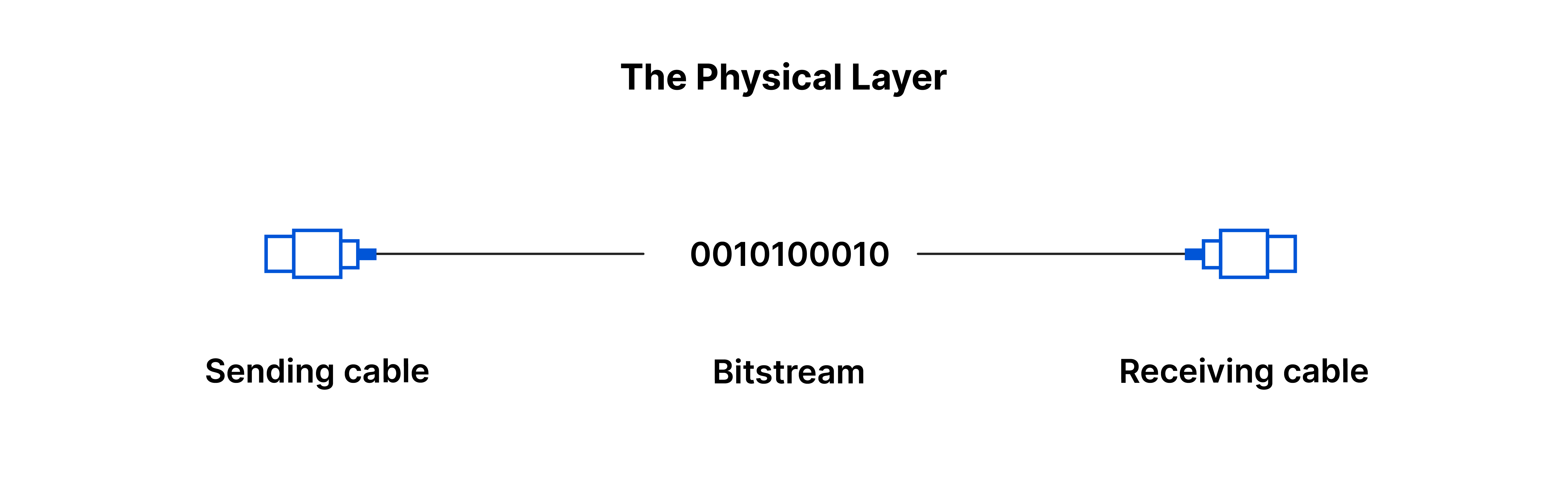
OSI Model - acronym "APSTNDP"
OSI model is like a set of rules that helps different computers and devices talk to each other in a standardized way.
It divides the process of communication into seven steps or layers, each responsible for a specific task. This makes it easier for different systems to work together, just like following a common set of instructions. So, no matter what type of device or network you have, as long as it follows these rules, it can communicate and share information with other systems that also follow the same rules.
Physical Layer (Layer 1): Delivery Guy
Physical Layer is like the "delivery guy" of the network. It takes the data from the sender, packages it in a suitable way for the specific delivery method (cables, wireless signals, etc.), ensures that it reaches its destination, and then hands it over to the receiver. This layer is primarily concerned with the physical means of getting data from one device to another and making sure it arrives intact.
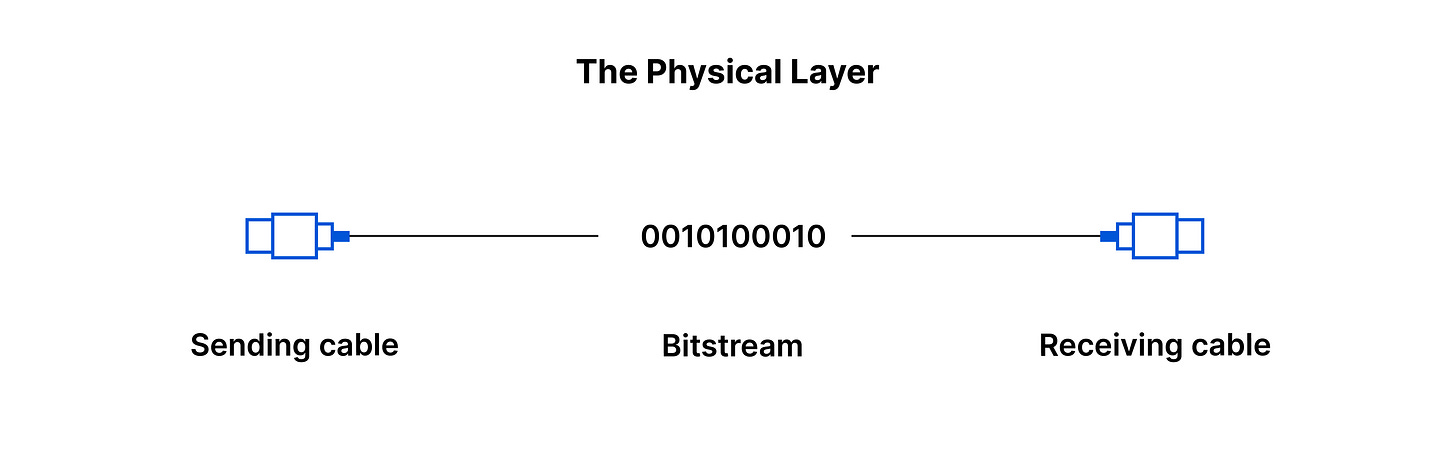
Resource https://www.cloudflare.com/en-gb/learning/ddos/glossary/open-systems-interconnection-model-osi/
The Data Link Layer(Layer 2 ) : "Traffic cop"
Second layer of the networking framework. It is responsible for managing the direct communication between devices that are connected to the same local network. In simple terms, it's like the "traffic cop" that ensures smooth and reliable communication on the local network.
Here's what the Data Link Layer does in more detail:
Error Detection and Correction: detect and correct errors.
Data Framing: Data sent over a network is broken down into smaller chunks called frames. The Data Link Layer puts a header (containing addressing information) and a trailer (with error-checking information) around each frame to mark the beginning and end of the data and to facilitate its reliable delivery.
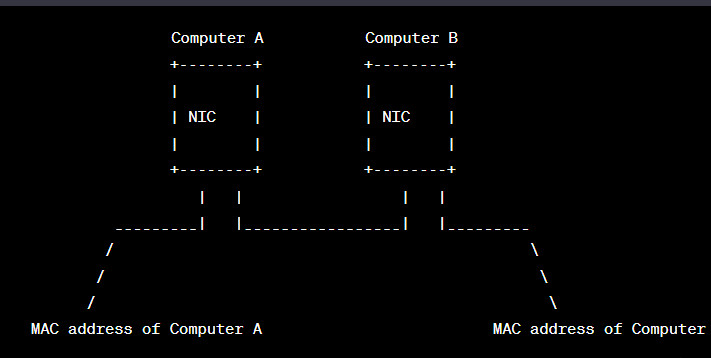
Media Access Control (MAC) Addressing: Every network device, like a network card or adapter, has a unique identifier called a MAC address. The Data Link Layer uses these MAC addresses to identify devices on the local network. This way, it can direct data to the correct device.
Controls Access: Since multiple devices share the same network, It uses a set of rules known as the Media Access Control (MAC) protocol to prevent data collisions and ensure fair access to the network.
Network Layer (Layer 3): "GPS" for data
Determines the best path for data to travel from the source to the destination across multiple networks.
Transport Layer (Layer 4):
Controlling the data flow to avoid congestion, and ensuring that all the data reaches its destination accurately and without errors.
TCP/UDP : protocols have their actions here, coming later
Session Layer (Layer 5): "Conversation manager"
The Session Layer is like a "conversation manager" for applications on different devices. Its main tasks are:
When two applications want to communicate with each other, they need to set up a "session" to keep their conversation organized. keeps it active while the applications are talking, and closes it when they are done.
Synchronizes data exchange between applications.
Presentation Layer (Layer 6): “Translator / formatter”
Focuses on data representation and translation for different applications to understand each other.
Application Layer (Layer 7):
The topmost layer, the Application Layer, interacts directly with end-user applications. It provides services and interfaces for applications to access network resources and services, such as email (SMTP), file transfer (FTP), and web browsing (HTTP).
Using the mnemonic "All People Seem To Need Data Processing" can help you remember both the order of the OSI layers and their respective word representations.
What is a LAN ?
a LAN (Local Area Network) is a network of computers and devices that are connected to each other within a relatively small area, like a home, office, or school. It allows these devices to communicate and share resources with each other, such as files, printers, and internet access. LANs are typically faster and more secure than accessing resources over the internet since the devices are physically close to each other and share a common network.
Typical usage
Local Area Networks (LANs) are commonly used in various settings for different purposes, including:
Sharing Resources
Internet Access
Email and Communication
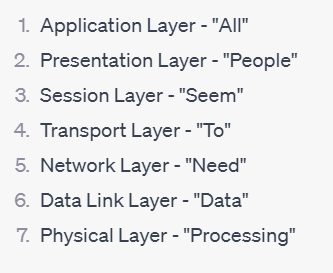
Intranets: Organizations often use LANs to host intranet websites for internal communications, announcements, and knowledge-sharing.
Security and Surveillance: LANs are used for setting up security systems, including IP cameras and access control devices.
Small Business Networking: LANs are common in small businesses where they help connect computers, printers, and other devices, streamlining workflows and improving productivity.
Typical geographical size
The range of a typical LAN is usually limited to a few hundred meters, such as within a building or a campus. To connect multiple LANs over larger distances, Wide Area Networks (WANs) or the internet are used.
What is a WAN ?
Typical usage
Spans a large geographic area, connecting multiple local area networks (LANs) together. Unlike LANs, which cover smaller regions like homes, offices, or campuses, WANs can cover entire cities, countries, or even span across continents. WANs are designed to enable long-distance communication between distant locations and allow organizations and individuals to connect and share data over vast geographical distances. Examples
Cloud Services: Many cloud-based services, such as cloud storage, software-as-a-service (SaaS), and cloud computing, rely on WANs to deliver data and applications to users from remote data centers.
Video Conferencing: WANs enable video conferencing and real-time communication between people in different cities or countries, fostering collaboration and reducing the need for travel.
Banking and Finance: WANs are used by financial institutions to connect their branches and provide online banking and other financial services to customers.
Telecommunication Networks
WAN would be used to connect offices located in separate buildings a few streets away. WAN technologies, such as leased lines, fiber optics, or wireless links. WANs are commonly used by organizations to interconnect their geographically dispersed offices and provide seamless communication and resource sharing across multiple locations.
Typical geographical size
vary significantly and depends on the specific network requirements and infrastructure. WANs can cover relatively small areas, such as connecting two neighboring cities, or they can span across entire continents, connecting different countries. The internet itself is a prime example of a global WAN, connecting networks and users worldwide. WANs typically involve long-distance communication and rely on various technologies, such as leased lines, fiber optics, satellites
What is the Internet ?
The Internet is like a vast global network of connected computers and devices. It allows people from all over the world to communicate, share information, and access various online services, like websites, emails, videos, and more.
What is an IP address ?
An IP address is like a unique identifier or address for a device connected to the internet or a network. It consists of a series of numbers, separated by dots, like "192.168.0.1." IP
What are the 2 types of IP address:
IPv4 (Internet Protocol version 4): This is the older and most widely used type of IP address. It uses a 32-bit number format and can represent around 4.3 billion unique addresses. IPv4 addresses are running out due to the growing number of devices connected to the internet.
IPv6 (Internet Protocol version 6): IPv6 is the newer and more advanced type of IP address. It uses a 128-bit number format and can provide an astronomical number of unique addresses, making it capable of accommodating the ever-expanding number of devices on the internet.
What is localhost ?
"Localhost" is like a special hostname used to refer to the computer you are currently using. It is often associated with the IP address 127.0.0.1. When you use "localhost" in your web browser or other applications, you are referring to your own computer, allowing you to test and access services running on your own machine.
What is a subnet ?
A subnet is like a smaller, separate network within a larger network. It's like dividing a large area into smaller neighborhoods. Subnets help manage and organize devices in a network, allowing more efficient routing and controlling network traffic.
Why IPv6 was created ?: IPv6 was created because IPv4, with its limited number of addresses, was running out of available addresses due to the rapid growth of the internet and the increasing number of devices connected to it. IPv6 provides a significantly larger pool of unique addresses, allowing for the continued growth of the internet and ensuring that all devices can be assigned a unique address, even as the number of connected devices continues to expand.
TCP/UDP
TCP/UDP: TCP (Transmission Control Protocol) and UDP (User Datagram Protocol) are the two mainly used data transfer protocols at the transport layer in the OSI model.
Main Difference between TCP and UDP: The main difference between TCP and UDP lies in their communication characteristics:
TCP provides reliable data transfer with error checking and retransmission if needed. It ensures that data is delivered accurately and in the correct order. However, this reliability comes with additional overhead, making TCP slower than UDP.
UDP, on the other hand, is a faster but less reliable protocol. It does not guarantee data delivery or error correction. Data packets sent via UDP may be lost or arrive out of order. It is commonly used for real-time applications like video streaming and online gaming, where speed is more critical than reliability.
What is a port ?
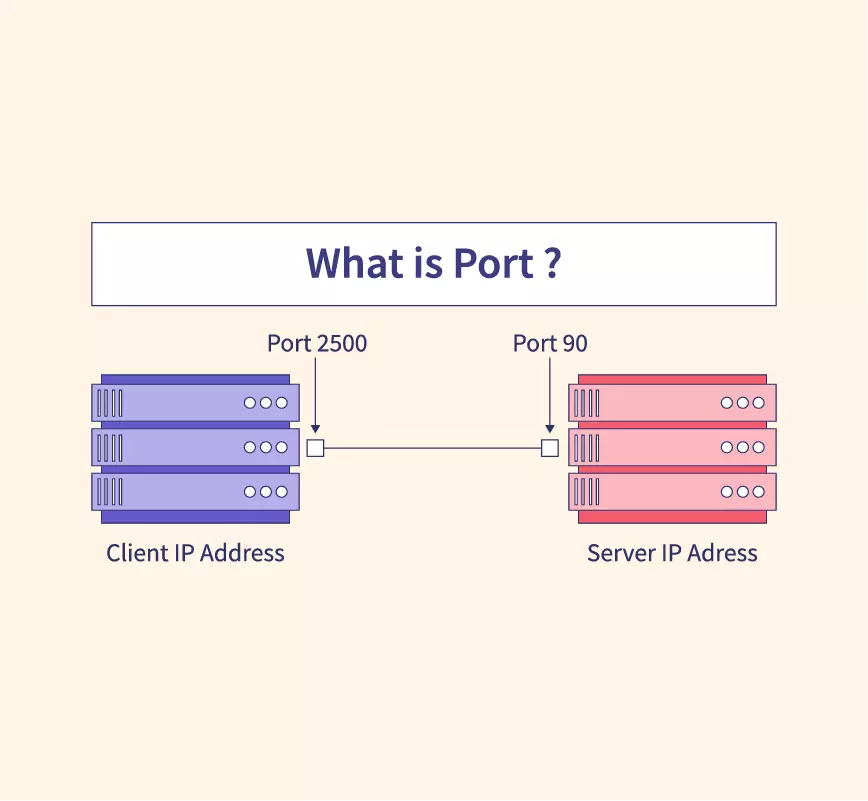
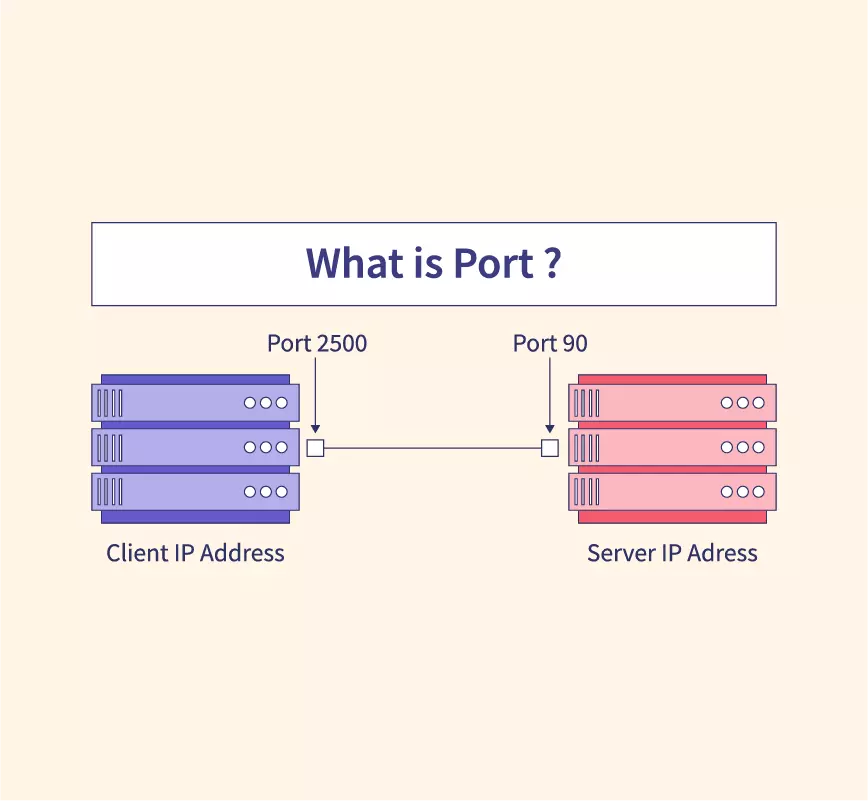
Port is just a unique number assigned to every application of a computers. In computer networking, each application or service running on a device is assigned a unique number known as a "port number." Port numbers help identify which application or service should handle incoming data packets. There are 65,536 port numbers available, ranging from 0 to 65535.
Resource : https://www.scaler.com/topics/images/what-is-port1_thumbnail.webp
SSH (Secure Shell) - Port Number: 22
SSH (Secure Shell): SSH is a secure network protocol used for secure remote access to computers and devices over a network. It provides encrypted communication between the client and the server.
HTTP (Hypertext Transfer Protocol) - Port Number: 80
application layer protocol used to transmit and receive web pages
HTTPS (Hypertext Transfer Protocol Secure) - Port Number: 443
secure version of HTTP that incorporates encryption to secure the data transmitted between the client (web browser) and the server (web server). It uses SSL/TLS (Secure Sockets Layer/Transport Layer Security) protocols to encrypt data.
Tool/Protocol to Check Device Connection:
The "ping" tool is commonly used to check if a device is connected to a network. It uses the ICMP (Internet Control Message Protocol) to send a small packet to the target device and waits for a response. If the target device responds, it means the device is connected and reachable on the network. Ping is widely used for troubleshooting network connectivity issues and determining the latency (ping time) between devices.
Definitions:
MAC address
Media Access Control address) is a unique identifier assigned to a network interface card (NIC) in a device. It is a hardware-based address used at the Data Link Layer (Layer 2) of the OSI model to uniquely identify a device on a local network.
Private and public address
Private address: A private IP address is used within a private network, like a home or office LAN. It is not directly accessible from the internet, allowing devices on the local network to communicate with each other, but they need a public IP address to access the internet.
Public address: A public IP address is assigned to a device by the internet service provider (ISP). It is globally routable on the internet, allowing devices to be identified and accessed from anywhere on the internet.
TCP/UDP ports List
TCP (Transmission Control Protocol) and UDP (User Datagram Protocol) use port numbers to direct data to specific applications running on a device. Here are some common port numbers for popular services:
SSH (Secure Shell) - Port 22 (TCP)
HTTP (Hypertext Transfer Protocol) - Port 80 (TCP)
HTTPS (HTTP Secure) - Port 443 (TCP)
FTP (File Transfer Protocol) - Port 21 (TCP)
DNS (Domain Name System) - Port 53 (UDP/TCP)
SMTP (Simple Mail Transfer Protocol) - Port 25 (TCP)
What is ping /ICMP ?
Ping is a utility used to check the reachability of a network device (usually a computer) and measure the round-trip time for data to travel from the source to the destination and back. It works using ICMP (Internet Control Message Protocol) packets. If the target device is reachable, it responds with an acknowledgment, and the round-trip time (ping time) is displayed.
Positional parameters
Positional parameters are variables used in command-line interfaces or shell scripts to represent arguments passed to a program or script when it is executed. The first argument is represented by $1, the second argument by $2, and so on. For example, if a script is executed as "script.sh apple orange," $1 would represent "apple," and $2 would represent "orange."
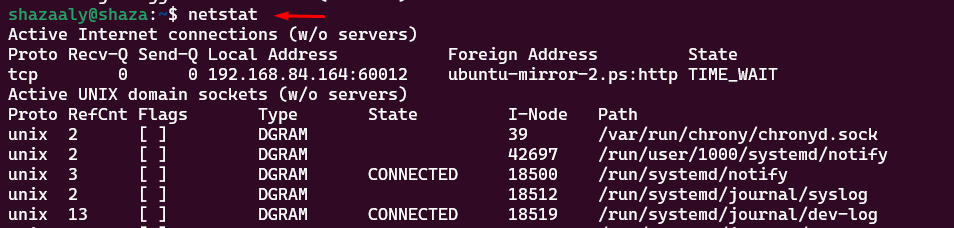
netstat: stands for "network statistics." It is a command-line tool used to display various network-related information on a computer. When you run the "netstat" command, it provides a list of active network connections, open ports, routing tables, and other network-related statistics on your system. It is useful for diagnosing network issues, monitoring
Resources:
Network Devices - Hosts, IP Addresses, Networks - Networking Fundamentals Playlist
Thank you so much ^^